gdb本地调试版本移植至ARM-Linux系统
 加入技术交流群
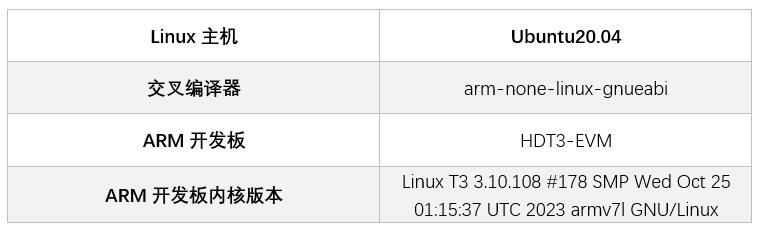
本文使用的ncurses版本为ncurses-5.9.tar.gz
下载地址:https://ftp.gnu.org/gnu/ncurses/ncurses-5.9.tar.gz
1. 将ncurses压缩包拷贝至Linux主机或使用wget命令下载并解压
tar-zxvf ncurses-5.9.tar.gz
2. 解压后进入到ncurses-5.9目录下
cdncurses-5.9
3. 在ncurses-5.9目录下创建编译完成后生成文件位置
mkdiroutput
cdoutput
mkdirarm-linux
4. 生成Makefile文件
./configure--target=arm-none-linux-gnueabi --prefix=$PWD/output/arm-linux --enable-termcap --with-shared --without-ada
l --target表示编译器的前缀,需要根据编译的不同需求进行修改
l --prefix表示编译完成后生成文件的位置
l --nable-termcap表示 关键代码使用 termcap(terminalcapabilities)数据库 [自动检测]
l --with-shared表示动态编译
5. 编译
make
当遇到如下报错时
Makefile:794:recipe for target '../obj_s/lib_gen.o' failed
make[1]:*** [../obj_s/lib_gen.o] Error 1
make[1]:Leaving directory '.../ncurses-5.9/ncurses'
Makefile:109:recipe for target 'all' failed
make:*** [all] Error 2
需要进入ncurses-5.9/include文件夹,修改 curses.tail 文件下的如下内容,将注释 /* generated */ 去掉
externNCURSES_EXPORT(bool) mouse_trafo(int*, int*, bool); /* generated*/
6. 安装
Makeinstall
7. 安装完成后会在/output/arm-linux目录下生成库文件,我们只需将lib目录下的libncurses.so.5 库拷贝至开发板
移植gdb
本文使用的gdb版本为gdb-7.12.tar.gz
下载地址:https://ftp.gnu.org/gnu/gdb/gdb-7.12.tar.gz
1. 将gdb压缩包拷贝至Linux主机或使用wget命令下载并解压
tar-zxvf gdb-7.12.tar.gz
2. 解压后进入到ncurses-5.9目录下
cdgdb-7.12
3. 生成Makefile文件
./configure -host=arm-none-linux-gnueabi CC=/home/vanxoak/CodeSourcery/Sourcery_G++_Lite/bin/arm-none-linux-gnueabi-gcc --enable-shared--prefix=$PWD/output/arm-linux --disable-werror --without-x --disable-gdbtk--disable-tui --without-included-regex --without-included-gettextLDFLAGS="-L$PWD/../output/arm-linux/lib"CPPFLASS="-I$PWD/../output/arm-linux/include"
l --host=arm-none-linux-gnueabi 用arm-none-linux-gnueabi编译
l CC为交叉编译器绝对路径
l --enable-shared 动态编译
l prefix=“$PWD/output/arm-linux” 安装目录
l --disable-werror 屏蔽werror报警
l --without-x 取消x windows 支持
l --disable-gdbtk 取消gdbtk
l --disable-tui 取消tui 界面
l --without-included-gettext 去掉用于多语言处理的gettext库
l "LDFLAGS=XXX"指交叉编译完成的ncurse的lib目录路径
l "CPPFLAGS=XXX"指是交叉编译完成的ncurse的include目录路径
4. 编译
make
5. 安装
makeinstall
安装完成后会在.../gdb-7.12/output/arm-linux/bin/目录下生成gdb可执行程序。
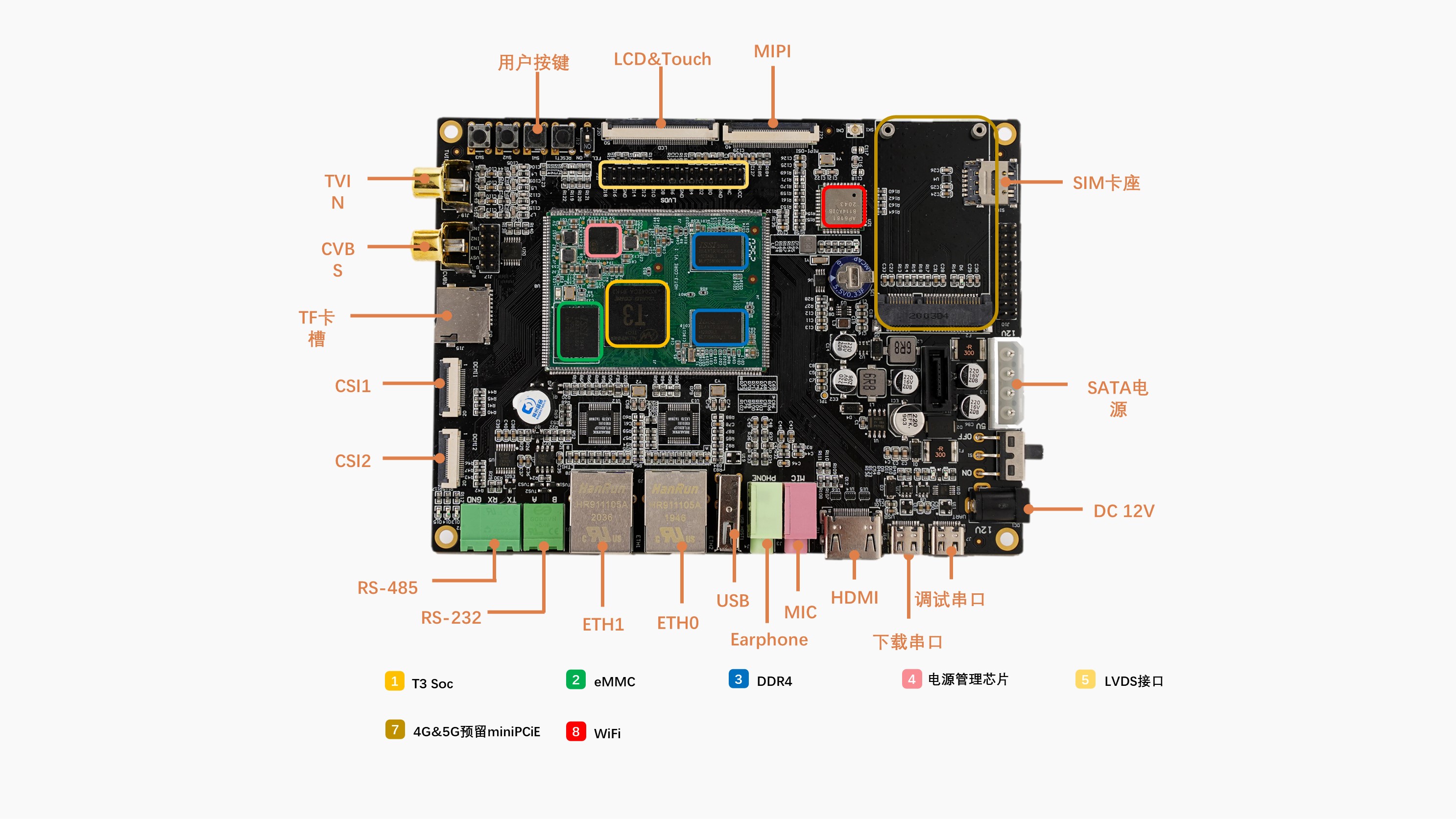
移植至HDT3-EVM 开发板
1. 将libncurses.so.5库 文件拷贝至/usr/lib目录下,若/usr目录下无lib目录可手动创建mkdir lib
2. 将gdb程序拷贝至/bin目录下
测试调试
1. 编写可执行测试程序,示例hello.c代码如下,该代码执行后会打印Hello World。
#include<stdio.h>
intmain(int argc, char *argv[])
{
printf("Hello World\n");
return 0;
}
2. 使用交叉编译器进行编译,需要注意的是,要使用gdb调试程序,需要在使用交叉编译器编译源代码时加上 " -g " 参数保留调试信息,否则不能使用GDB进行调试且报如下最后一行所示错误:
/home# gdb hello
GNUgdb (GDB) 7.12
Copyright(C) 2016 Free Software Foundation, Inc.
LicenseGPLv3+: GNU GPL version 3 or later <http://gnu.org/licenses/gpl.html>
Thisis free software: you are free to change and redistribute it.
Thereis NO WARRANTY, to the extent permitted by law. Type "show copying"
and"show warranty" for details.
ThisGDB was configured as "arm-none-linux-gnueabi".
Type"show configuration" for configuration details.
Forbug reporting instructions, please see:
<http://www.gnu.org/software/gdb/bugs/>.
Findthe GDB manual and other documentation resources online at:
<http://www.gnu.org/software/gdb/documentation/>.
Forhelp, type "help".
Type"apropos word" to search for commands related to "word"...
Readingsymbols from hello...(no debugging symbols found)...done.
3. 使用交叉编译器编译测试程序
arm-none-linux-gnueabi-gcc-g -o hello hello.c
4. 将生成的hello文件拷贝至HDT3-EVM 开发板上并使用sync命令保存
5. 输入gbd命令启动gdb程序
/home# gdb
GNUgdb (GDB) 7.12
Copyright(C) 2016 Free Software Foundation, Inc.
LicenseGPLv3+: GNU GPL version 3 or later <http://gnu.org/licenses/gpl.html>
Thisis free software: you are free to change and redistribute it.
Thereis NO WARRANTY, to the extent permitted by law. Type "show copying"
and"show warranty" for details.
ThisGDB was configured as "arm-none-linux-gnueabi".
Type"show configuration" for configuration details.
Forbug reporting instructions, please see:
<http://www.gnu.org/software/gdb/bugs/>.
Findthe GDB manual and other documentation resources online at:
<http://www.gnu.org/software/gdb/documentation/>.
Forhelp, type "help".
Type"apropos word" to search for commands related to "word".
(gdb)
上述代码(gdb)为GBD内部命令引导符,表示等待用户输入gbd命令
6. 使用 " file hello " 命令载入被调试的测试程序
(gdb)file hello
Readingsymbols from hello...done.
显示Reading symbols from hello...done.表示被测程序加载成功
7. 使用 " r "命令执行调试测试程序
(gdb)r
Startingprogram: /home/hello
HelloWorld
[Inferior1 (process 849) exited normally]
如上述代码显示 " Hello World " 即表示hello程序执行完成
(gdb)help
Listof classes of commands:
aliases-- Aliases of other commands
breakpoints-- Making program stop at certain points
data-- Examining data
files-- Specifying and examining files
internals-- Maintenance commands
obscure-- Obscure features
running-- Running the program
stack-- Examining the stack
status-- Status inquiries
support-- Support facilities
tracepoints-- Tracing of program execution without stopping the program
user-defined-- User-defined commands
Type"help" followed by a class name for a list of commands in that class.
Type"help all" for the list of all commands.
Type"help" followed by command name for full documentation.
Type"apropos word" to search for commands related to "word".
Commandname abbreviations are allowed if unambiguous.
*博客内容为网友个人发布,仅代表博主个人观点,如有侵权请联系工作人员删除。
相关推荐
WinCE+ARM开发及关键技术 上
摩尔线程推出ARM架构SoC“长江” 进军笔记本芯片市场
振动式报警器电路图
最新ARM技术和嵌入式技术发展动态 中
ARM嵌入式软件编程经验谈
WinCE+ARM开发及关键技术 下
最新ARM技术和嵌入式技术发展动态 下
ARM嵌入式系统开发:软件设计与优化
ARM嵌入式系统开发
NVIDIA计划推出基于ARM的SoC
Arm自研芯片掀「跨界战争」 台积电旗下创意恐首当其冲
Arm重磅推出AGI CPU 1OU 双节点参考服务器
Arm AGI CPU:智能体式人工智能云时代的芯片基石
uClinux系统分析
嵌入式LINUX开发套件常见问题解答
arm学习资料
Arm与Linaro联合发起行业联盟 CoreCollective
天势科技与Arm战略合作,为人工智能驱动的个人 “智能自动驾驶汽车” 提供技术支持
英伟达能否打破PC处理器的竞争格局?
Linux系统的DS18B20驱动程序源代码
Linux内核源代码的阅读和工具介绍(aqian转)
[转帖]NeuLinux嵌入式Linux开发平台
康佳特推出首款 Arm 架构 SMARC 模块
Arm再创季度营收纪录
基于Linux平台的温度传感器DS18B20驱动程序设计
基于ARM-Linux的MiniGUI的仿真与移植
ARM开发详解
ARM 展示小型低功耗上网本样品
Linux系统下USB摄像头驱动开发
uClinux系统分析