OLED 显示雷达数据
 加入技术交流群
本文结合之前关于串口打印雷达监测数据的研究,进一步扩展至 OLED 屏幕显示。
该项目整体分为两部分:
一、框架显示;
二、数据采集与填充显示。
为了减小 MCU 负担,采用 局部刷新 的方案。
1. 显示框架
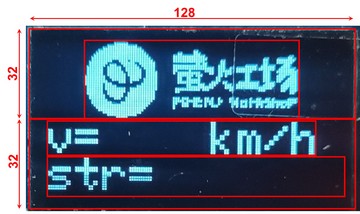
所需库函数 Wire.h 、Adafruit_GFX.h 、Adafruit_SSD1306.h .
代码#include <Wire.h>
#include <Adafruit_GFX.h>
#include <Adafruit_SSD1306.h>
#include "logo_128x64.h"
#include "logo_95x32.h"
#define OLED_RESET 4
Adafruit_SSD1306 display(128, 64, &Wire, OLED_RESET);
void setup()
{
Serial.begin(115200);
display.begin(SSD1306_SWITCHCAPVCC, 0x3C); // initialize with the I2C addr 0x3C (for the 128x64)
display.clearDisplay(); // 清屏
display.drawBitmap(0, 0, logo, 128, 64, 1); //画出字符对应点阵数据
display.display();
delay(1000);
display.clearDisplay();
/*-------------------- Display picture and text ---------------------------*/
display.drawBitmap(16, 0, logo_small, 95, 32, 1);
display.setTextColor(WHITE); //设置字体颜色
display.setTextSize(2); //设置字体大小 1 is default 6x8, 2 is 12x16, 3 is 18x24
display.setCursor(0,33); //设置起始光标
display.print("v=");
display.setCursor(72,33); //设置起始光标
display.print("km/h");
display.setCursor(0,49); //设置起始光标
display.print("str=");
display.display();
}
void loop()
{
}效果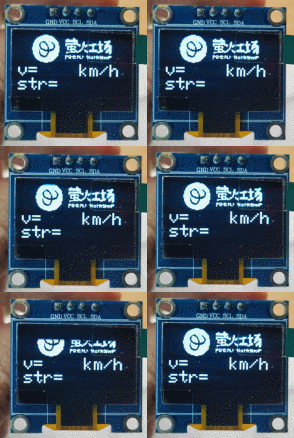
目标:实现雷达监测数据的对应填充显示,包括速度 v 和信号强度 str
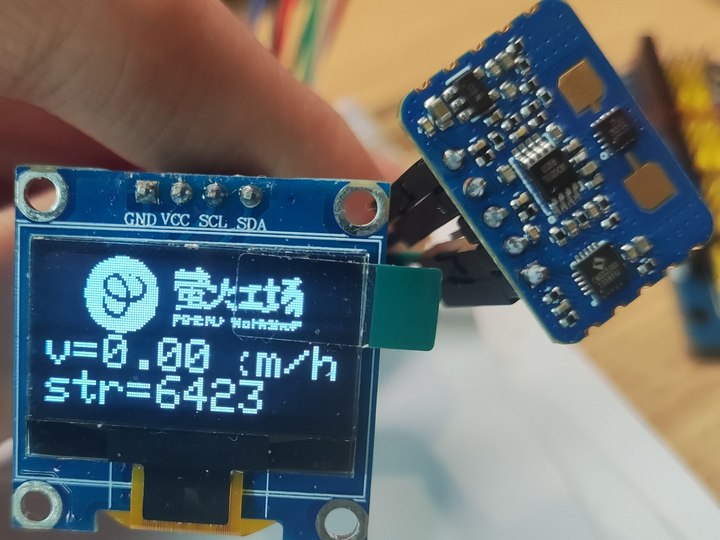
思路:将之前帖子中实现的串口打印数据与 OLED 显示框架结合,将 v 和 str 两数据分别填充至 OLED 屏预留位置处即可。
#include <Wire.h>
#include <Adafruit_GFX.h>
#include <Adafruit_SSD1306.h>
#include "logo_128x64.h"
#include "logo_95x32.h"

#define OLED_RESET 4
Adafruit_SSD1306 display(128, 64, &Wire, OLED_RESET);

String comdata = "";

void setup()
{
  Serial.begin(115200);
  while (Serial.read() >= 0){}//clear serialbuffer
  display.begin(SSD1306_SWITCHCAPVCC, 0x3C);  // initialize with the I2C addr 0x3C (for the 128x64)
  display.clearDisplay(); // 清屏
  display.drawBitmap(0, 0, logo, 128, 64, 1); //画出字符对应点阵数据
  display.display();
  delay(1000);
  display.clearDisplay();
  /*-------------------- Display picture and text ---------------------------*/
  display.drawBitmap(16, 0, logo_small, 95, 32, 1);
  display.setTextColor(WHITE);  //设置字体颜色
  display.setTextSize(2);  //设置字体大小 1 is default 6x8, 2 is 12x16, 3 is 18x24
  display.setCursor(0,33); //设置起始光标
  display.print("v=");
  display.setCursor(80,33); //设置起始光标
  display.print("km/h");
  display.setCursor(0,49); //设置起始光标
  display.print("str=");
  display.display();
}

void loop()
{
  if (Serial.available() > 0)
  {
    char data = Serial.read();
    comdata += data;
    if (data == '\n')
    {// type of comdata: v=1.0 km/h, str=10151
      int separatorIndex = comdata.indexOf(','); // 假设分隔符为逗号
      if (separatorIndex != -1)
      {
        String part1 = comdata.substring(0, separatorIndex); // 第一个部分
        String part2 = comdata.substring(separatorIndex + 1); // 第二个部分
        // 打印分割后的数据
        //Serial.println(part1); // type of part1: v=1.0 km/h
        //Serial.println(part2); // type of part2:  str=10151
        /*------------ part1 : v=1.0 km/h ----------*/
        int part1separatorIndex = part1.indexOf('='); //index of '='
        if (part1separatorIndex != -1)
        {
          String vlc = part1.substring(part1separatorIndex + 1); // index of velocity, type of vlc is 1.0 km/h
          // vlc: 1.0 km/h
          int VLCseparatorIndex = vlc.indexOf(' '); // index of ' '
          String v = vlc.substring(0, VLCseparatorIndex);// v only include number
          float Vn = v.toFloat();
          Serial.print(Vn); // print velocity number
          Serial.print(',');
          //display.setCursor(25,33); //设置起始光标
          display.fillRect(25, 33, 60, 16, BLACK);
          display.display();
          display.setCursor(25,33); //设置起始光标
          display.print(Vn);
          display.display();
        }
        /*------------- part2 :  str=10151 ------------------*/
        int part2separatorIndex = part2.indexOf('='); //index of '='
        if (part2separatorIndex != -1)
        {
          String strng = part2.substring(part2separatorIndex + 1); // strng only include number
          int Sn = strng.toInt();
          Serial.print(Sn); // print strength number
          Serial.println();
          //display.setCursor(49,49); //设置起始光标
          display.fillRect(49, 49, 79, 16, BLACK);
          //display.setPixelColor();
          display.display();
          display.setCursor(49,49); //设置起始光标
          display.print(Sn);
          display.display();
        }
      }
      comdata = "";
    }
  }
}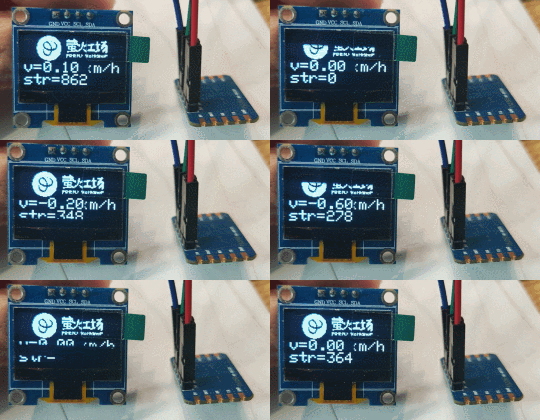
这里由于字体设置为 2 号,无法满足 km/h 单位的完整填充,因此被数据覆盖住一部分,可根据实际需求调整字体大小。
*博客内容为网友个人发布,仅代表博主个人观点,如有侵权请联系工作人员删除。
关键词:
雷达
Arduino
OLED
串口
相关推荐
vxworks中编写串口驱动?(老站转)
usb转232电路
电脑串口、并口连接线大全
什么是 Linduino
[转帖]串口驱动编写实例解读(一)
2026年全球显示设备支出将大增,OLED成主要驱动力
[转帖]Vxworks串口驱动编写实例解读
微波雷达探测自动灯电路(1)(RD627)
雷达监控语言报警器
串口问题!(老站转)
可伸缩OLED刚刚有了巨大升级
全球首条8.6代OLED生产线进入量产并开始发货
微波雷达探测自动灯电路(4)(TWH9250)
3D8S的“脱机运行”
请教VXWORKS中串口收发通讯程序的问题(老站转)
超级串口调试器 V2.1.0
USB转并口、串口电路图(ch341).
三星显示据传考虑扩产OLED产能,因苹果或计划2027年推出第二款折叠屏iPhone
消息称三星拿下苹果2000万块iPhone Fold屏幕订单,5月开始量产
MWC 2026风向标:BOE(京东方)以创新技术赋能全球伙伴,“好屏”定义显示行业新高度
微波雷达探测自动灯电路(2)(RD9418)
在 Ubuntu 12.04 上安装 Arduino IDE
高通收购Arduino带来了全新的氛围——UNO Q上的人工智能与信号处理
ArduinoISP, Hex & Bootloader
Arduino硬件模拟器 vs 实物零件:哪个更合适?
微波雷达探测自动灯电路(3)(TWH9248/9249)
据报道,中国CSOT将首次为三星Galaxy A57提供灵活的OLED设备
1 物联网与嵌入式开发
车载太赫兹雷达能否挽救生命?
超宽带雷达信号电路的设计与实现